As and when the construction of this blog, I propose, using some tutorials to share with you how I proceeded to conceive.
 Google Analytics (GA) is a fully free, accessible to all. It allows monitoring extremely full attendance of its site . Rather it is wise to install and configure it from the design of the blog. As GA is already installed on my blog génération68, I thought of you try this on another site I manage creative. I invite you to visit it also works as it outlines that are enchanting to the eye: www.vero-sadako.com . Please note that the site in question is an over-site blog which proves the versatility of GA. Access to the site account opening and registration at: http://www.google.com/analytics/fr-FR/ .
 Google Analytics (GA) is a fully free, accessible to all. It allows monitoring extremely full attendance of its site . Rather it is wise to install and configure it from the design of the blog. As GA is already installed on my blog génération68, I thought of you try this on another site I manage creative. I invite you to visit it also works as it outlines that are enchanting to the eye: www.vero-sadako.com . Please note that the site in question is an over-site blog which proves the versatility of GA. Access to the site account opening and registration at: http://www.google.com/analytics/fr-FR/ .
 - Once on the homepage as you do not have an account, click on "Register Now"
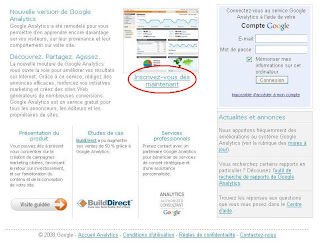
- On the new page after a brief presentation GA (Did you see? Interesting huh?), click again on the registration option:

- You finally arrive at the account creation page where you must return the address mail address associated with your blog as long at it, a password specific to GA and the characters finally anti bots:
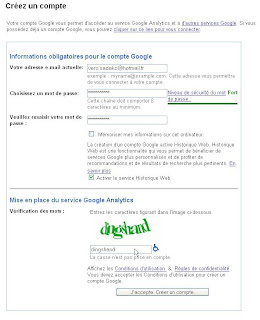
- GA will send you a confirmation email the address you have provided. You must click the link provided to confirm your registration. Attention, it may take several hours before the arrival of mail in question:

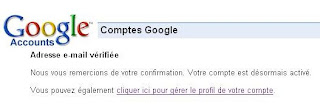
- Once confirmation is done, return to GA http://www.google.com/analytics/fr- EN / then enter it (in the area of subscribers this time) your email address and password specific to GA:

- You go to a page showing you the Google services you are automatically enrolled (Analytics and Web history) and those to which you qualify and I'll leave to study. Some may be extremely interesting as they are mostly free, at least for their basic benefits:
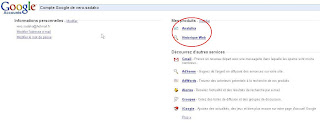
- By clicking on "Analytics" will find the latest step inputed . Click on "Register"

- You will now indicate the GA site that it should track and some additional information:
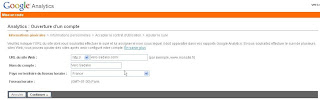
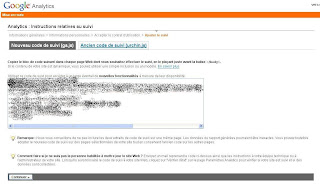
- After accepting the terms of use of GA, you get to the important part of the setup GA for your site. For that GA can effectively track your blog, insert it on a pre-built code which you simply copy and paste the correct location. not panic then! The process is easy. We will show how to make a blog over-blog but remember that the process is even easier for a blogger. First, here is the code. It is grayed out on this screenshot because some sensitive information there. Select it in its entirety and then copy it (Ctrl-C):
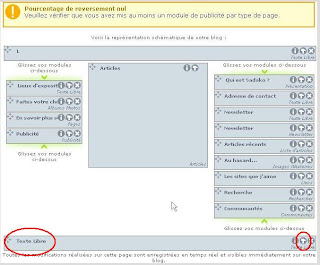
- must now work on the blog itself to paste the code provided by GA. Nothing could be easier. For Over-Blog Blog, you must enter your ID and password to access the blog administration. Once there, click "Configure" then "Page Setup". To blog Vero Sadako, I introduced footer free text (see photo) in order to copy the HTML content, ie the code (in this case to show the number of visitors present on the site now). In your case, it will be yours to make. In Generally, it is best to introduce the GA code at the bottom of the page because it can slow down page loads. If at the end of the page slowdown has no impact on the latency of accessing the site visitor. To change the code, you click first on the little hammer:

- The text that appears in the new window (if there is text, which is doubtful) is a normal text. To work on the code itself, we must switch to HTML. To do this, simply click the far left of the window on the word "html". Depending on circumstances, the window can be either empty or already include code as in my case. Here is the code that appears on my blog before copying the code GA:

-
And here is the code that appears after the code GA (shaded) copied after the original code. In your case, it is possible that there have only code that the GA:
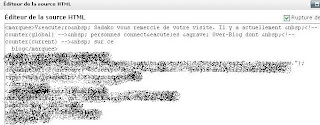
- Save your changes, quit the administration of your blog and refresh it by clicking anywhere on the page host and then pressing F5 to activate the new code GA. Now, go back to GA http://www.google.com/analytics/fr-FR/ , enter your email password. The page that occurs when you propose to review the "profile website. What interests us here is the status column where you would normally see a "tracking code unknown. This is normal. To standardize things, just click below on "Check status"

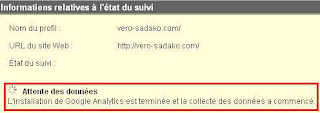
- A message appears stating that the data collection started. Attention must be at least 24 hours before seeing the first usable results. When you return to the "profile web site, you will see that the tracking is configured:

- Now when you connect to GA (username, password), you can access the dashboard of traffic to your blog. The latter deserves a tutorial on its own as it is complete. Here's an idea of the kind of information you'll find. Here everything is at zero because, firstly GA has not yet had time to collect all the information because it takes about 24 hours the first time. Furthermore, such information is confidential, including site management businesses. Enjoy it well!


